Instant
01 · Ask
Ask the AI a follow-up
Got more questions about visual Display Installation? Describe the bit you're unsure about — the AI explains options, sequencing and what to ask the home automation.

Commercial digital signage, video walls or large-format displays — supplied, fitted and content-loaded.
You've read the brief on visual Display Installation. Now lean on us to find the right home automation — and stay in control of the job.
Got more questions about visual Display Installation? Describe the bit you're unsure about — the AI explains options, sequencing and what to ask the home automation.
Costs, timelines, pitfalls and the right questions to ask before any home automation starts on visual Display Installation.
Itemised quotes from up to 3 local home automations on visual Display Installation — so you can compare like-for-like, not lump sums.
Ready when you are
Enter your postcode and get free quotes from local pros.
Four moves that separate a smooth job from a nightmare.
Mounting a screen at picture-frame height leads to significant neck strain; eye level should ideally be at the centre of the screen.
Recessing a display into a tight "niche" without airflow can lead to overheating and premature hardware failure.
Using standard plastic rawlplugs in plasterboard for a heavy 75-inch TV is a recipe for disaster.
Running unshielded data cables too close to power lines can cause signal "ghosting" or dropouts.
Indicative UK ranges and what affects price.
By job type
Quote spread is typically ± 18% — always get 3 quotes.
Home Automation quick-view
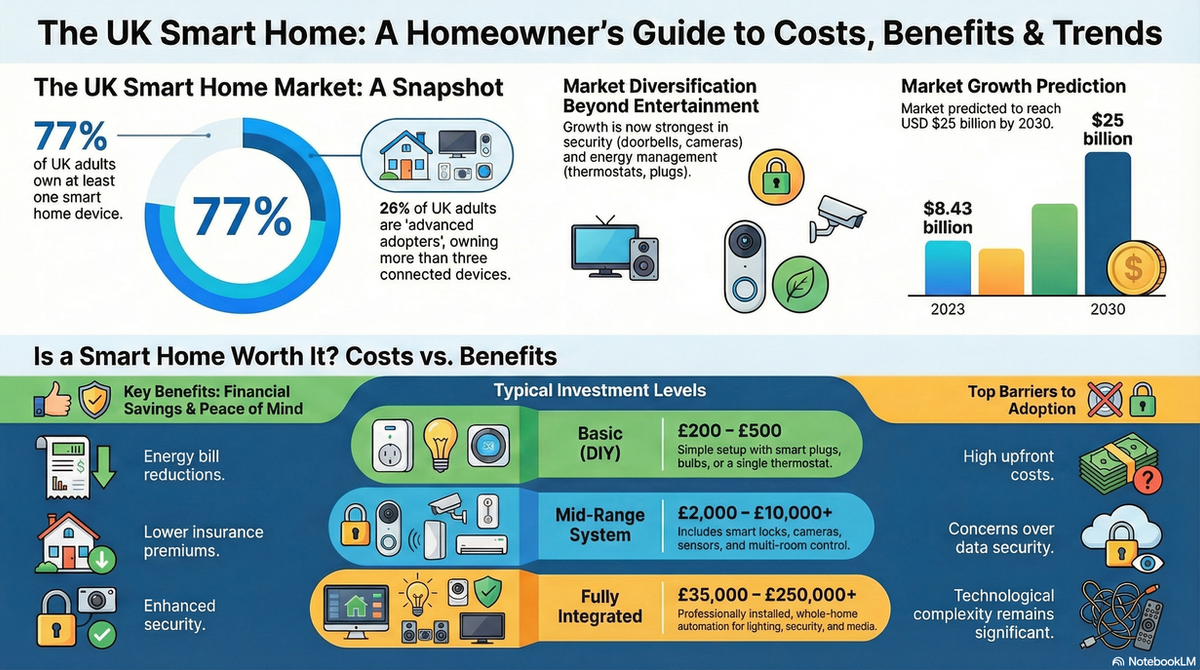
Home Automation explained
For UK homeowners, the challenge often lies in our diverse housing stock, ranging from solid Victorian brickwork to modern "dot and dab" plasterboard. A professional installer navigates these structural hurdles while ensuring all cabling meets British safety standards and remains discreetly hidden from view.
| Item | Low £ | High £ | Notes |
|---|---|---|---|
| Basic Wall Mounting (up to 55") | £150 | £250 | External cabling/trunking only. |
| Large Screen Install (65"+) | £250 | £450 | Requires two-person lift and heavy-duty fixings. |
| Hidden Cable Installation | £200 | £500 | Chasing into masonry or fishing through studs. |
| Media Wall Integration | £1,200 | £5,000+ | Full bespoke carpentry and AV setup. |
| Projector & Screen Setup | £400 | £900 | Ceiling mounting and alignment. |
Pricing is primarily influenced by the wall type and the complexity of cable concealment. Chasing cables into solid brick walls requires "making good" with plaster and paint, which will increase labour costs compared to fishing wires through a hollow stud wall.
Pro Tip: Always buy high-quality HDMI 2.1 cables for in-wall installations. Replacing a failed cheap cable behind a finished wall is an expensive and frustrating mistake.
While a basic 32-inch screen on a solid wall is a manageable DIY task, larger displays and complex mounting require professional expertise. Modern OLED screens are incredibly thin and prone to cracking if handled incorrectly during the mounting process.
Furthermore, any work involving the installation of new electrical sockets must comply with Part P of the Building Regulations. A professional AV installer will often work alongside a qualified electrician to ensure your setup is both legal and safe, particularly when "daisy-chaining" power behind a wall.
It is possible, but not always recommended. The heat can damage the internal components, and the height is usually ergonomically poor. If you must do it, use a "mantel mount" that pulls down for viewing and ensures the chimney breast is properly insulated.
If you cannot chase the walls, use high-quality D-Line trunking. This is a semi-circular conduit that can be painted to match your wall colour, making it far less intrusive than standard square trunking.
Solid brick or blockwork is the most secure. However, modern stud walls can safely hold large screens if the bracket is secured directly into the timber studs rather than just the plasterboard.
Most standard VESA-compliant brackets will work with curved TVs, but you may need specific spacers (usually provided in the box) to account for the depth of the screen's chassis.
Yes, most specialist AV installers include "handover and commissioning" in their quote. This involves connecting the display to your network and ensuring your streaming apps and external devices are functioning correctly.
This guide was written with AI assistance and is intended for general information only. Prices are estimates based on UK averages and may vary by region. Always get at least three quotes and consult a qualified professional before starting any work.
Ask follow-ups in plain English. The AI explains options, sequencing and what to ask the home automation — so you walk in informed.
Modern UK homes are increasingly reliant on complex media systems, from integrated Sonos multi-room audio to bespoke 4K home cinemas and smart lighting. When th...
READ GUIDE →GuideA professionally installed surround sound system is the cornerstone of any high-quality home cinema experience. Whether you are looking for a standard 5.1 setup...
READ GUIDE →GuideModern home entertainment has evolved far beyond simply plugging in a television. Audio and display integration focuses on creating a seamless, high-performance...
READ GUIDE →GuideA high-end media system is often the heart of a modern UK home, providing everything from cinematic experiences to multi-room audio. However, with complex integ...
READ GUIDE →GuideWhen your smart home system fails, the inconvenience is immediate. From lights that won't turn on to security cameras that refuse to record, an automation outag...
READ GUIDE →GuideMaintaining a high-quality audio system is about more than just preserving sound clarity; it is about protecting a significant investment in your home’s enterta...
READ GUIDE →