Instant
01 · Ask
Ask the AI a follow-up
Got more questions about emergency Home Automation? Describe the bit you're unsure about — the AI explains options, sequencing and what to ask the home automation.

Smart-home system down, locked out of controls — diagnosed and fixed same-day where possible.
You've read the brief on emergency Home Automation. Now lean on us to find the right home automation — and stay in control of the job.
Got more questions about emergency Home Automation? Describe the bit you're unsure about — the AI explains options, sequencing and what to ask the home automation.
Costs, timelines, pitfalls and the right questions to ask before any home automation starts on emergency Home Automation.
Itemised quotes from up to 3 local home automations on emergency Home Automation — so you can compare like-for-like, not lump sums.
Ready when you are
Enter your postcode and get free quotes from local pros.
Four moves that separate a smooth job from a nightmare.
When two devices try to use the same "address" on your network, the system crashes. Use "Static IPs" for all core automation hardware to avoid this.
An interrupted update can render a hub useless. A pro can often "force-flash" the device to bring it back to life.
Adding a new powerful Wi-Fi router can sometimes drown out the lower-power signals used by smart bulbs and sensors.
Systems that rely on external servers (like Nest or Hive) will fail if your internet is down or the manufacturer’s server is offline.
Indicative UK ranges and what affects price.
By job type
Quote spread is typically ± 18% — always get 3 quotes.
Home Automation quick-view
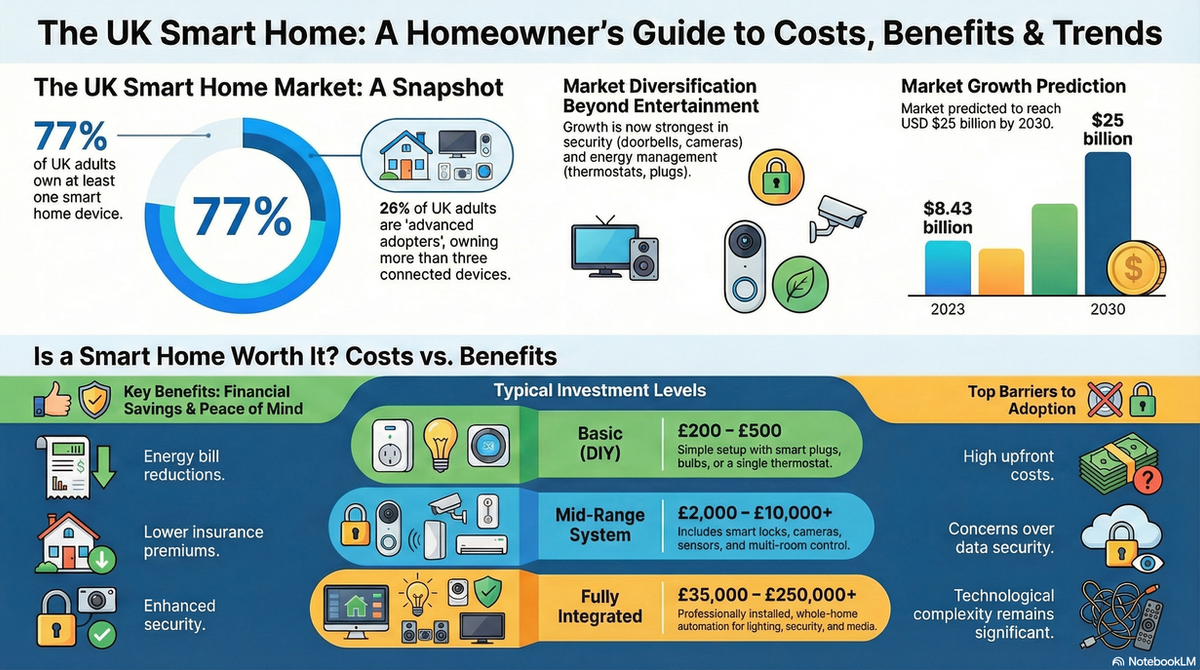
Home Automation explained
For UK homeowners, these systems are often the backbone of energy management and security. Rapid intervention ensures that "smart" features don't become expensive wall decorations and that your home remains secure, heated, and functional.
Emergency rates for home automation are typically higher than standard AV installations due to the specialised diagnostic skills required. Most technicians charge a fixed call-out fee that covers the first hour of troubleshooting.
| Item | Low £ | High £ | Notes |
|---|---|---|---|
| Emergency Call-Out Fee | £120 | £250 | Includes travel and the first 60 mins. |
| Labour (per hour) | £75 | £120 | Applies after the first hour. |
| Replacement Hub/Gateway | £80 | £450 | Depends on brand (e.g., Hue vs. Control4). |
| Software Re-programming | £150 | £400 | Flat fee for complex logic restoration. |
| Total Project Average | £195 | £650 | Inc. VAT and basic parts. |
Prices vary significantly based on the complexity of your system. A basic Wi-Fi-based setup is generally cheaper to fix than a hardwired KNX or Crestron system, which requires proprietary software tools and high-level engineering expertise.
You can often resolve minor issues by power-cycling your router and main hub. However, if your system involves hardwired modules behind light switches or inside your consumer unit, you must hire a professional. UK Part P Building Regulations dictate that any work on fixed electrical installations must be carried out by a competent person to ensure safety and insurance compliance.
Professional intervention is essential for high-end systems like Control4 or Lutron, as these often require dealer-level software access that is not available to the general public.
Power surges often cause network routers to reboot faster than smart hubs. This results in the hub failing to secure an IP address. Try turning everything off and then powering them up in this order: Modem, Router, then Smart Hub.
Generally, no. While a standard electrician can fix the wiring, they rarely have the software training required to program the logic or troubleshoot network protocols. You need a dedicated Smart Home or AV Integrator.
Many UK integrators offer "Service Level Agreements" (SLAs). While not mandatory, these often guarantee a 4-hour or 24-hour response time and include remote monitoring to fix bugs before you even notice them.
Have your Wi-Fi password, any master admin passwords for your automation accounts, and clear access to your router and "hub" location (usually under the stairs or in a media rack).
Warning: A factory reset should be a last resort. It will delete all your settings, schedules, and device pairings. Always try a "soft reboot" (unplugging for 30 seconds) first.
This guide was written with AI assistance and is intended for general information only. Prices are estimates based on UK averages and may vary by region. Always get at least three quotes and consult a qualified professional before starting any work.
Ask follow-ups in plain English. The AI explains options, sequencing and what to ask the home automation — so you walk in informed.
Modern UK homes are increasingly reliant on complex media systems, from integrated Sonos multi-room audio to bespoke 4K home cinemas and smart lighting. When th...
READ GUIDE →GuideA professionally installed surround sound system is the cornerstone of any high-quality home cinema experience. Whether you are looking for a standard 5.1 setup...
READ GUIDE →GuideModern visual display installation has evolved far beyond simply hanging a television on a wall. Whether you are installing a flush-mount Gallery OLED, a bespok...
READ GUIDE →GuideModern home entertainment has evolved far beyond simply plugging in a television. Audio and display integration focuses on creating a seamless, high-performance...
READ GUIDE →GuideA high-end media system is often the heart of a modern UK home, providing everything from cinematic experiences to multi-room audio. However, with complex integ...
READ GUIDE →GuideMaintaining a high-quality audio system is about more than just preserving sound clarity; it is about protecting a significant investment in your home’s enterta...
READ GUIDE →