Instant
01 · Ask
Ask the AI a follow-up
Got more questions about smart Lighting Installation? Describe the bit you're unsure about — the AI explains options, sequencing and what to ask the home automation.

Hue, Lutron or LIFX smart lighting — bulbs, scenes, schedules and voice control set up by a smart-home installer.
You've read the brief on smart Lighting Installation. Now lean on us to find the right home automation — and stay in control of the job.
Got more questions about smart Lighting Installation? Describe the bit you're unsure about — the AI explains options, sequencing and what to ask the home automation.
Costs, timelines, pitfalls and the right questions to ask before any home automation starts on smart Lighting Installation.
Itemised quotes from up to 3 local home automations on smart Lighting Installation — so you can compare like-for-like, not lump sums.
Ready when you are
Enter your postcode and get free quotes from local pros.
Four moves that separate a smooth job from a nightmare.
Often caused by using non-dimmable bulbs with smart dimmers or a lack of a "load capacitor" on low-wattage circuits.
Smart bulbs at the edge of the property failing to respond; solved by using a "mesh" network (Zigbee/Thread) rather than standard Wi-Fi.
Smart switches are deeper than traditional ones; you may need your wall "chased out" to fit them.
Family members turning off the physical switch, which kills power to the "smart" brain; solved by installing smart buttons or internal relays.
Indicative UK ranges and what affects price.
By job type
Quote spread is typically ± 18% — always get 3 quotes.
Home Automation quick-view
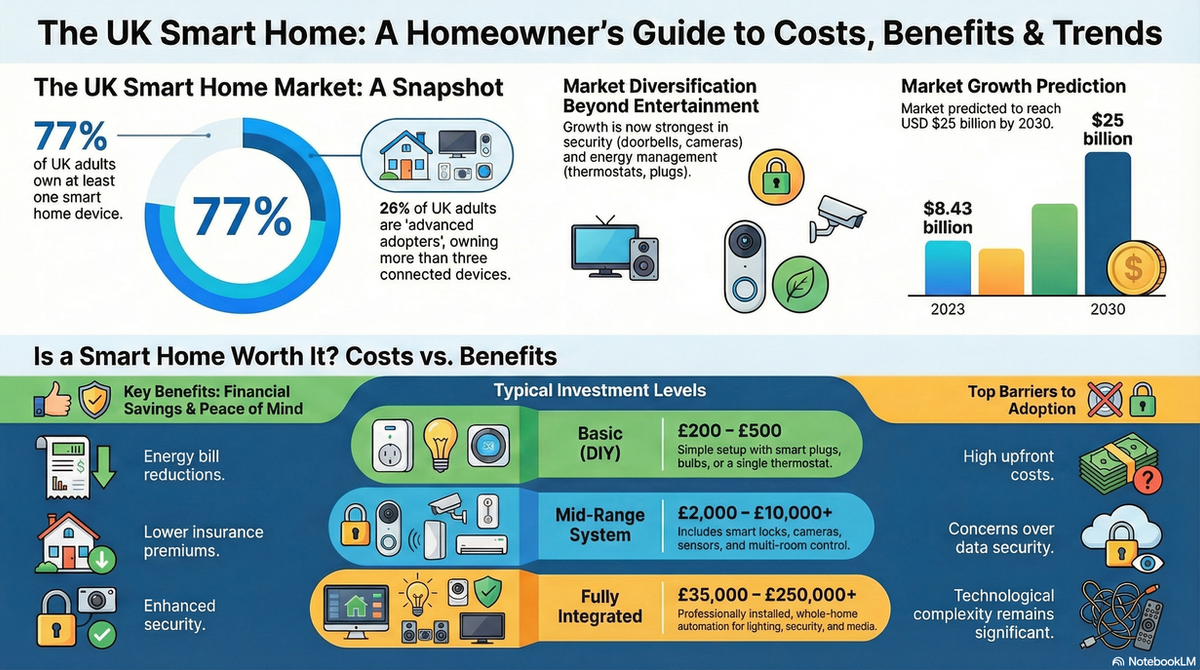
Home Automation explained
For UK homeowners, the challenge often lies in older wiring systems. Navigating the compatibility between traditional circuits and modern wireless protocols requires a blend of electrical expertise and technical networking knowledge to ensure a stable, flicker-free experience.
| Item / Service | Low £ | High £ | Notes |
|---|---|---|---|
| Single Room Setup (Bulbs & Hub) | £150 | £400 | Basic plug-and-play kits with professional setup. |
| Smart Switch Installation (per switch) | £80 | £160 | Includes hardware and minor wiring modifications. |
| Whole House System (3-Bed Semi) | £1,800 | £5,000 | Comprehensive retrofit with dimmers and sensors. |
| Specialist Labour (per hour) | £55 | £90 | Rates vary by region (London/SE usually higher). |
Prices are influenced primarily by the choice of ecosystem—standard Wi-Fi bulbs are cheaper, while high-end "no-neutral" systems like Lutron or Rako command a premium for their reliability and aesthetic finish.
Replacing a standard lightbulb with a smart bulb is a simple DIY task. However, if your project involves replacing wall switches, installing dimmers, or modifying your consumer unit, you must hire a professional. UK building regulations require electrical work in "special locations" or the addition of new circuits to be certified.
Expert Tip: Many UK homes lack a neutral wire at the switch. A professional can install "no-neutral" dimmers or bypasses that prevent the "ghost glowing" or flickering common with DIY smart lighting attempts.
No. Most modern smart lighting systems are designed for retrofitting. You can use smart bulbs or smart switches that work with your existing wiring, even if you don't have a neutral wire at the switch.
If you use a system based on Zigbee, Z-Wave, or Clear Connect (like Lutron), your physical switches and pre-set schedules will still work without internet. Only remote app control from outside the home will be lost.
In many older UK properties, the neutral wire goes directly to the light fixture, not the switch. Many smart switches require a neutral wire for constant power. A professional can help you select 'no-neutral' switches to avoid costly rewiring.
Yes. By using occupancy sensors (lights turn off when you leave a room) and dimming schedules, you can reduce energy waste. Additionally, moving from old halogens to smart LEDs provides an immediate consumption drop.
Technically yes, but it can lead to a messy experience with multiple apps. It is better to use a universal hub (like Homey or Samsung SmartThings) or ensure all devices are 'Matter' compatible for a seamless experience.
This guide was written with AI assistance and is intended for general information only. Prices are estimates based on UK averages and may vary by region. Always get at least three quotes and consult a qualified professional before starting any work.
Ask follow-ups in plain English. The AI explains options, sequencing and what to ask the home automation — so you walk in informed.
Modern UK homes are increasingly reliant on complex media systems, from integrated Sonos multi-room audio to bespoke 4K home cinemas and smart lighting. When th...
READ GUIDE →GuideA professionally installed surround sound system is the cornerstone of any high-quality home cinema experience. Whether you are looking for a standard 5.1 setup...
READ GUIDE →GuideModern visual display installation has evolved far beyond simply hanging a television on a wall. Whether you are installing a flush-mount Gallery OLED, a bespok...
READ GUIDE →GuideModern home entertainment has evolved far beyond simply plugging in a television. Audio and display integration focuses on creating a seamless, high-performance...
READ GUIDE →GuideA high-end media system is often the heart of a modern UK home, providing everything from cinematic experiences to multi-room audio. However, with complex integ...
READ GUIDE →GuideWhen your smart home system fails, the inconvenience is immediate. From lights that won't turn on to security cameras that refuse to record, an automation outag...
READ GUIDE →