Instant
01 · Ask
Ask the AI a follow-up
Got more questions about cCTV System Repair? Describe the bit you're unsure about — the AI explains options, sequencing and what to ask the alarms & security.

Camera offline, NVR full, app not loading — fixed without ripping out the whole system.
You've read the brief on cCTV System Repair. Now lean on us to find the right alarms & security — and stay in control of the job.
Got more questions about cCTV System Repair? Describe the bit you're unsure about — the AI explains options, sequencing and what to ask the alarms & security.
Costs, timelines, pitfalls and the right questions to ask before any alarms & security starts on cCTV System Repair.
Itemised quotes from up to 3 local alarms & securitys on cCTV System Repair — so you can compare like-for-like, not lump sums.
Ready when you are
Enter your postcode and get free quotes from local pros.
Four moves that separate a smooth job from a nightmare.
Insects are attracted to the heat of IR LEDs; webs can trigger false motion alerts and blur images. Regular cleaning prevents this.
CCTV drives run 24/7 and usually fail every 3-5 years. If your system isn't recording, this is the most likely culprit.
UK storms can fry power supply units (PSUs). Installing a surge-protected power strip is a cheap way to avoid expensive repairs.
If external junction boxes aren't IP66-rated, moisture will eat through the copper connections, causing "flickering" video.
Indicative UK ranges and what affects price.
By job type
Quote spread is typically ± 18% — always get 3 quotes.
Alarms & Security quick-view
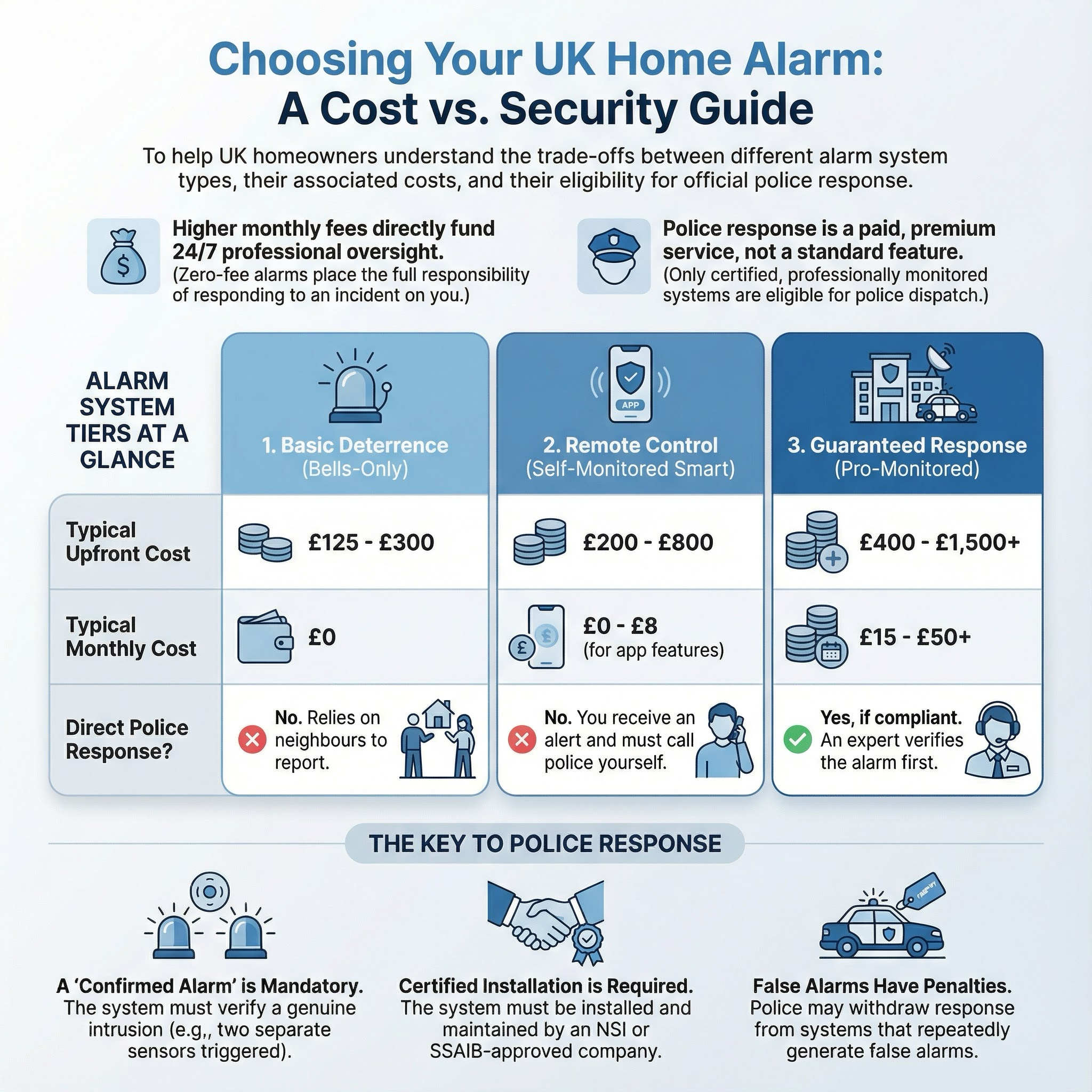
Alarms & Security explained
Modern security systems range from simple Wi-Fi cameras to complex hardwired IP networks. Professional repair ensures that the delicate balance of data transmission, power supply, and storage remains stable, providing you with high-definition evidence should the worst happen.
The cost of CCTV repair depends heavily on the type of system (Analogue vs IP) and the height at which cameras are mounted. Most UK technicians charge a fixed call-out fee that covers the first hour of diagnostics.
| Item | Low £ | High £ | Notes |
|---|---|---|---|
| Call-out / First Hour | £85 | £150 | Higher in London/SE; includes basic diagnostics. |
| Labour (Hourly Rate) | £60 | £90 | Applies after the first hour of work. |
| Replacement IP Camera | £90 | £250 | Varies by resolution (4K) and features. |
| Security Hard Drive (2TB) | £75 | £120 | Specialised "Surveillance Grade" drives. |
| Cabling Repair (per run) | £40 | £100 | Includes new connectors and weatherproofing. |
| Average Total Repair | £160 | £350 | Typical range for a standard 4-camera system. |
Price factors include the need for specialist access equipment (like cherry pickers for high-mounted cameras), the age of the system (obsolete parts may require full replacements), and the distance between the cameras and the recorder.
Homeowners can handle basic maintenance such as cleaning lenses with a soft cloth or checking that the recorder is plugged in. However, most repairs require a professional. CCTV systems involve working at height, handling delicate low-voltage electronics, and configuring network settings that can be easily "bricked" by an amateur.
If your system is hardwired into your consumer unit (fuse box), a professional with Part P electrical knowledge should handle the power supply repairs to ensure safety and compliance.
This is usually caused by "IR reflection." If the camera lens is dirty, or if there is an object (like a gutter or leaf) too close to the lens, the infrared light bounces back into the sensor, blinding it. A simple clean or slight angle adjustment usually fixes this.
Yes, often you can. Technologies like TVI, CVI, and AHD allow high-definition signals (up to 4K) to travel over old-fashioned coaxial cables. You will likely need a new DVR, but you can save hundreds on labour by reusing the existing wires.
This is typically a networking issue. It could be a changed IP address, a disconnected Ethernet cable, or a firmware update required on the recorder. A technician can usually fix this via a remote login or a quick site visit.
For UK homes, an annual service is recommended. This includes checking all connections, cleaning lenses, testing the battery backup, and ensuring the hard drive is still recording correctly.
No, recordings are stored on non-volatile hard drives. However, a sudden power loss can occasionally corrupt the "file table." A professional can often recover this data, and they may recommend installing a UPS (Uninterruptible Power Supply) to prevent future issues.
This guide was written with AI assistance and is intended for general information only. Prices are estimates based on UK averages and may vary by region. Always get at least three quotes and consult a qualified professional before starting any work.
Ask follow-ups in plain English. The AI explains options, sequencing and what to ask the alarms & security — so you walk in informed.
Removing an old or obsolete alarm system is a common task for UK homeowners, especially when upgrading to smart technology or during home renovations. A redunda...
READ GUIDE →GuideFor UK homeowners who operate home-based workshops, laboratories, or studios involving hazardous chemicals, a functioning emergency eyewash station is a critica...
READ GUIDE →GuideElectric gates are a premium addition to any UK home, offering enhanced security, privacy, and significant kerb appeal. For many homeowners, the convenience of ...
READ GUIDE →GuideWhen a burglar alarm triggers unexpectedly or shows a persistent fault code, it is more than just a noise nuisance. A malfunctioning security system leaves your...
READ GUIDE →GuideA functional gate is the first line of defence for your UK home, providing essential security, privacy, and kerb appeal. Whether it is a sagging timber side gat...
READ GUIDE →GuideModern home security has evolved beyond the traditional lock and key. For UK homeowners, access control systems offer a sophisticated way to manage who enters y...
READ GUIDE →