Instant
01 · Ask
Ask the AI a follow-up
Got more questions about retail Technology Fit-Out? Describe the bit you're unsure about — the AI explains options, sequencing and what to ask the shop fitting.

EPOS, CCTV, Wi-Fi, music, lighting control — full retail technology fit-out integrated for daily operations.
You've read the brief on retail Technology Fit-Out. Now lean on us to find the right shop fitting — and stay in control of the job.
Got more questions about retail Technology Fit-Out? Describe the bit you're unsure about — the AI explains options, sequencing and what to ask the shop fitting.
Costs, timelines, pitfalls and the right questions to ask before any shop fitting starts on retail Technology Fit-Out.
Itemised quotes from up to 3 local shop fittings on retail Technology Fit-Out — so you can compare like-for-like, not lump sums.
Ready when you are
Enter your postcode and get free quotes from local pros.
Four moves that separate a smooth job from a nightmare.
Using a standard domestic broadband line for a busy store leads to slow card transactions and laggy digital displays.
Poorly managed cables behind counters are a trip hazard and make troubleshooting hardware issues much harder.
Placing Wi-Fi access points near large metal structures or mirrors, which are common in retail, can create "dead zones."
Failing to use Uninterruptible Power Supplies (UPS) can lead to data loss or hardware damage during UK power surges.
Indicative UK ranges and what affects price.
By job type
Quote spread is typically ± 18% — always get 3 quotes.
Shop Fitting quick-view
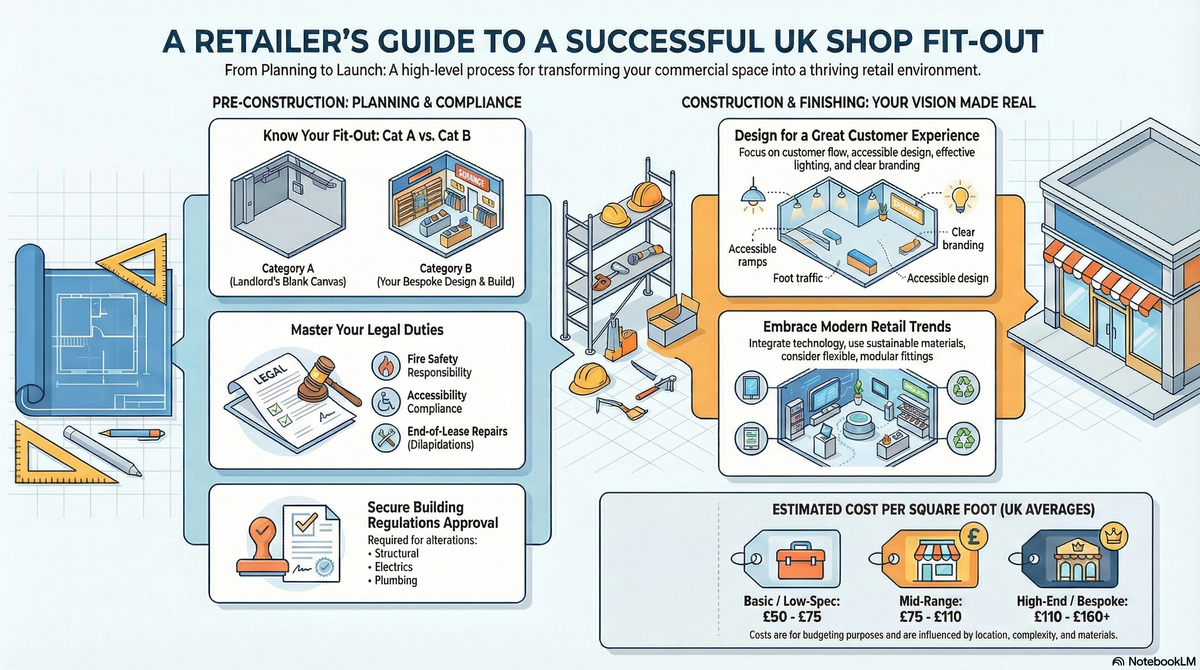
Shop Fitting explained
Whether you are launching a boutique high-street shop or upgrading an existing unit, the "backbone" of your technology is as critical as your storefront. From structured cabling to secure guest Wi-Fi, getting the technical installation right the first time prevents costly downtime and security vulnerabilities later on.
| Item / Service | Low £ | High £ | Notes |
|---|---|---|---|
| Initial Site Survey & Design | £350 | £850 | Includes network mapping and hardware spec. |
| Data Cabling (per point) | £150 | £250 | Includes Cat6 cable, faceplate, and testing. |
| POS System Setup (per unit) | £400 | £1,200 | Hardware mounting and software integration. |
| Digital Signage Installation | £500 | £2,500 | Price varies by screen size and bracket type. |
| Network Infrastructure (Core) | £800 | £3,000 | Business-grade router, switch, and WAPs. |
| Specialist Labour (Day Rate) | £350 | £600 | Experienced retail tech engineers. |
Prices in 2025/26 are heavily influenced by the complexity of the building’s architecture. Older UK buildings with thick stone walls often require more extensive cabling and signal boosters, whereas modern "shell and core" units allow for faster, cheaper installations.
While unboxing a tablet-based POS system might seem like a DIY task, a full retail fit-out requires professional expertise. Any electrical modifications must comply with Part P of the Building Regulations, and structured cabling must be certified to ensure it meets data speed requirements.
Professional installation is essential for insurance purposes; many UK commercial insurers will not cover data breaches or electrical fires if the systems were not installed by certified contractors.
No. Domestic routers are not designed to handle the simultaneous connections of multiple customers, POS systems, and security cameras. You need a business-grade system with a dedicated firewall and guest network isolation.
Most professional fit-out teams offer "out-of-hours" installations (evenings or weekends) to ensure zero downtime for your business, though this may incur a small premium on labour rates.
A professional fit-out should include a "failover" system, such as a 4G/5G backup router, ensuring your POS system can still process card payments even if the main line fails.
It is highly recommended. Most installers offer a Maintenance Service Agreement (MSA) to provide software updates, security patches, and hardware replacements, usually costing 10-15% of the initial project cost annually.
During the site survey, your installer should measure "nits" (brightness levels). High-brightness, anti-glare commercial displays are required for window-facing installations to remain visible in direct sunlight.
This guide was written with AI assistance and is intended for general information only. Prices are estimates based on UK averages and may vary by region. Always get at least three quotes and consult a qualified professional before starting any work.
Ask follow-ups in plain English. The AI explains options, sequencing and what to ask the shop fitting — so you walk in informed.
For UK small business owners and those running retail or hospitality ventures from home, a reliable Point of Sale (PoS) system is the heartbeat of the operation...
READ GUIDE →GuideFor UK small business owners and retailers, an Electronic Point of Sale (EPOS) system is the heartbeat of the operation. Far more than a simple cash register, a...
READ GUIDE →GuideFor UK independent retailers and boutique owners, the transition from a traditional till to an integrated digital register is a pivotal step in modernising a bu...
READ GUIDE →GuideIntegrating a modern Electronic Point of Sale (EPOS) system is a critical step in any retail or hospitality shop-fitting project. Beyond just a cash register, a...
READ GUIDE →GuideRetail shop fitting and refurbishment. UK costs.
READ GUIDE →GuideRestaurant fit-out cost. UK pricing.
READ GUIDE →