Instant
01 · Ask
Ask the AI a follow-up
Got more questions about point Of Sale (PoS) Maintenance? Describe the bit you're unsure about — the AI explains options, sequencing and what to ask the shop fitting.

Annual EPOS maintenance — hardware service, software updates and staff training refresher.
You've read the brief on point Of Sale (PoS) Maintenance. Now lean on us to find the right shop fitting — and stay in control of the job.
Got more questions about point Of Sale (PoS) Maintenance? Describe the bit you're unsure about — the AI explains options, sequencing and what to ask the shop fitting.
Costs, timelines, pitfalls and the right questions to ask before any shop fitting starts on point Of Sale (PoS) Maintenance.
Itemised quotes from up to 3 local shop fittings on point Of Sale (PoS) Maintenance — so you can compare like-for-like, not lump sums.
Ready when you are
Enter your postcode and get free quotes from local pros.
Four moves that separate a smooth job from a nightmare.
Often caused by cheap, low-quality receipt rolls that leave excessive dust behind, eventually burning out the print head.
Usually a result of "ghost touches" caused by grease buildup or poor calibration settings.
Frequently traced back to unshielded cables or interference from other kitchen/retail appliances.
Systems slowing down because years of transaction history haven't been archived properly.
Indicative UK ranges and what affects price.
By job type
Quote spread is typically ± 18% — always get 3 quotes.
Shop Fitting quick-view
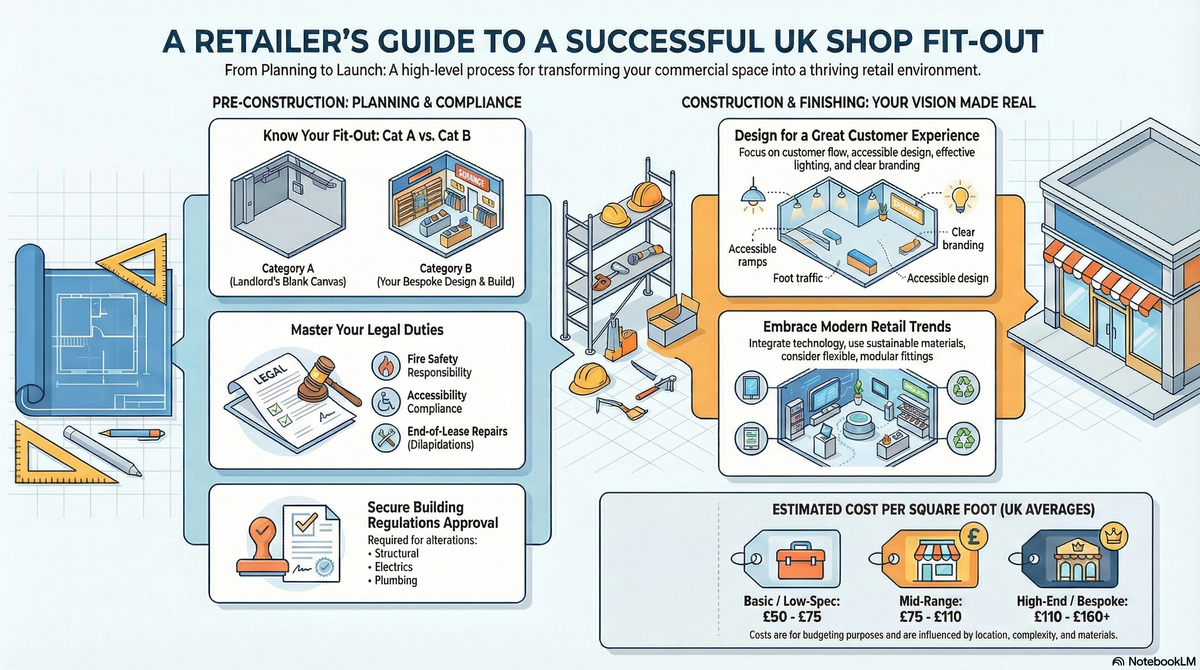
Shop Fitting explained
Regular PoS maintenance ensures your hardware remains secure, your software stays compliant with UK payment standards, and your hardware longevity is maximised. This guide outlines the essential maintenance tasks, current UK market costs, and what to look for in a professional technician.
| Item | Low £ | High £ | Notes |
|---|---|---|---|
| Emergency Call-out (Inc. first hour) | £110 | £175 | Higher rates for out-of-hours or bank holidays. |
| Standard Labour (per hour) | £65 | £95 | Applies after the initial call-out period. |
| Annual Maintenance Contract | £250 | £500 | Per terminal; usually includes remote support. |
| Consumables & Small Parts | £20 | £80 | Cables, cleaning kits, or replacement power bricks. |
| Total (Typical Minor Service) | £175 | £320 | Inclusive of 20% VAT. |
Costs are primarily driven by the complexity of your network and the age of your hardware. Specialist "legacy" systems that require hard-to-find parts will typically sit at the higher end of the price bracket.
While daily tasks like cleaning screens with approved wipes or clearing printer jams are straightforward DIY jobs, technical maintenance should be left to the pros. In the UK, card payment security is strictly regulated; an incorrectly configured network could void your business insurance or lead to non-compliance fines.
Professional technicians ensure your system adheres to PCI DSS (Payment Card Industry Data Security Standard), which is essential for protecting your customers' sensitive financial data.
For most UK retailers, an annual professional service is sufficient. However, high-traffic environments like cafes or bars should consider a bi-annual check to address the increased wear and tear from dust and spills.
No. Standard glass cleaners often contain ammonia or alcohol which can strip the protective anti-glare coating from PoS displays. Use only specialist electronic wipes or a dry microfibre cloth.
This is usually a network latency issue. A technician will check if your router is prioritising PoS traffic (Quality of Service settings) or if there is a bottleneck in your broadband line.
Yes, always. While most modern cloud-based systems sync automatically, you should perform a manual backup of your local database and transaction logs to prevent any data loss during hardware testing.
Not quite. Software updates change the features you see on screen, while firmware updates the "internal brain" of the hardware components. Both are vital for security and performance.
Non-compliance can lead to significant monthly fines from your merchant bank and, in the event of a data breach, could leave you liable for all fraudulent losses.
This guide was written with AI assistance and is intended for general information only. Prices are estimates based on UK averages and may vary by region. Always get at least three quotes and consult a qualified professional before starting any work.
Ask follow-ups in plain English. The AI explains options, sequencing and what to ask the shop fitting — so you walk in informed.
Modern retail is no longer just about shelves and stock. To compete in the current UK market, a physical store must provide a seamless, tech-driven experience t...
READ GUIDE →GuideFor UK small business owners and retailers, an Electronic Point of Sale (EPOS) system is the heartbeat of the operation. Far more than a simple cash register, a...
READ GUIDE →GuideFor UK independent retailers and boutique owners, the transition from a traditional till to an integrated digital register is a pivotal step in modernising a bu...
READ GUIDE →GuideIntegrating a modern Electronic Point of Sale (EPOS) system is a critical step in any retail or hospitality shop-fitting project. Beyond just a cash register, a...
READ GUIDE →GuideRetail shop fitting and refurbishment. UK costs.
READ GUIDE →GuideRestaurant fit-out cost. UK pricing.
READ GUIDE →