Instant
01 · Ask
Ask the AI a follow-up
Got more questions about digital Register Integration? Describe the bit you're unsure about — the AI explains options, sequencing and what to ask the shop fitting.

EPOS, payment terminal and stock-system integration — for retail or hospitality fit-outs.
You've read the brief on digital Register Integration. Now lean on us to find the right shop fitting — and stay in control of the job.
Got more questions about digital Register Integration? Describe the bit you're unsure about — the AI explains options, sequencing and what to ask the shop fitting.
Costs, timelines, pitfalls and the right questions to ask before any shop fitting starts on digital Register Integration.
Itemised quotes from up to 3 local shop fittings on digital Register Integration — so you can compare like-for-like, not lump sums.
Ready when you are
Enter your postcode and get free quotes from local pros.
Four moves that separate a smooth job from a nightmare.
Registers frequently disconnecting because the router is too far from the counter or blocked by thick walls.
Buying "cheap" receipt printers or scanners online that do not talk to the chosen POS software.
Failing to clean data before integration, resulting in ghost inventory and inaccurate stock levels.
Staff being unable to process returns or apply discounts because the "end-user" training was skipped.
Indicative UK ranges and what affects price.
By job type
Quote spread is typically ± 18% — always get 3 quotes.
Shop Fitting quick-view
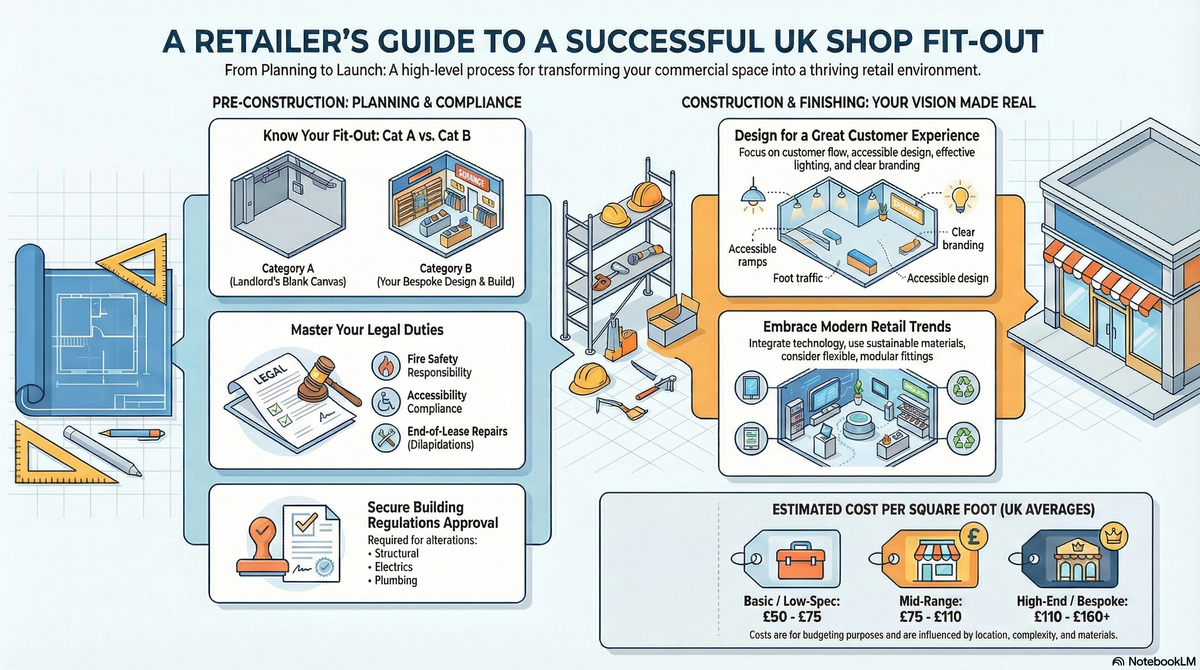
Shop Fitting explained
A seamless integration reduces human error, prevents overselling, and provides the data insights needed to grow. Whether you are fitting out a new high-street unit or upgrading a home-based studio, getting the technical foundation right is essential for long-term efficiency.
The cost of digital register integration depends on the complexity of your inventory and whether you require physical hardware installation as part of a shop fit-out. Prices below include VAT and reflect current 2025/26 UK market rates.
| Item | Low £ | High £ | Notes |
|---|---|---|---|
| Initial Consultation & Audit | £150 | £350 | Review of existing tech and requirements. |
| Basic Single-Site Integration | £400 | £850 | Setup of one register and basic inventory. |
| Multi-Channel Integration | £1,000 | £2,500 | Linking physical shop with online store and warehouse. |
| Hardware Mounting & Cabling | £250 | £600 | Physical installation of stands and data points. |
| Ongoing Software Subscription | £40 | £150 | Monthly SaaS fee per register. |
Labour costs are often influenced by the quality of your existing data; if a specialist needs to manually clean and format a messy product list, the project cost will increase significantly.
While many modern POS systems market themselves as "plug and play," a professional installation is highly recommended for commercial environments. A specialist ensures that your network is secure and that your VAT settings are compliant with UK law. If you attempt a DIY setup and the data sync fails, you risk losing sales data or facing significant inventory discrepancies that are costly to fix later.
Professional shop fitters will ensure all cabling is hidden and hardware is ergonomically positioned, creating a cleaner look for your customer-facing counters.
Not necessarily. Many digital registers require specific "integrated" card terminals to ensure the price is automatically pushed from the till to the reader. Check compatibility before purchasing new hardware.
Most professional POS systems have an "Offline Mode" that allows you to continue taking payments, which then sync to the cloud once the connection is restored. Always confirm this feature is active.
A digital register is the hardware (the till), whereas a POS (Point of Sale) is the entire ecosystem, including the software that manages sales, inventory, and reporting.
Yes, iPads are very common for UK small businesses. However, they require a commercial-grade stand and reliable charging solutions to withstand the rigours of daily retail use.
Most systems allow for a CSV or Excel upload. A specialist will help you format this file correctly to ensure that descriptions, prices, and stock levels migrate without errors.
This guide was written with AI assistance and is intended for general information only. Prices are estimates based on UK averages and may vary by region. Always get at least three quotes and consult a qualified professional before starting any work.
Ask follow-ups in plain English. The AI explains options, sequencing and what to ask the shop fitting — so you walk in informed.
For UK small business owners and those running retail or hospitality ventures from home, a reliable Point of Sale (PoS) system is the heartbeat of the operation...
READ GUIDE →GuideModern retail is no longer just about shelves and stock. To compete in the current UK market, a physical store must provide a seamless, tech-driven experience t...
READ GUIDE →GuideFor UK small business owners and retailers, an Electronic Point of Sale (EPOS) system is the heartbeat of the operation. Far more than a simple cash register, a...
READ GUIDE →GuideIntegrating a modern Electronic Point of Sale (EPOS) system is a critical step in any retail or hospitality shop-fitting project. Beyond just a cash register, a...
READ GUIDE →GuideRetail shop fitting and refurbishment. UK costs.
READ GUIDE →GuideRestaurant fit-out cost. UK pricing.
READ GUIDE →