Instant
01 · Ask
Ask the AI a follow-up
Got more questions about cCTV Installation? Describe the bit you're unsure about — the AI explains options, sequencing and what to ask the alarms & security.

Camera positioning, NVR setup, cabling and viewing app — costed by camera count and storage.
You've read the brief on cCTV Installation. Now lean on us to find the right alarms & security — and stay in control of the job.
Got more questions about cCTV Installation? Describe the bit you're unsure about — the AI explains options, sequencing and what to ask the alarms & security.
Costs, timelines, pitfalls and the right questions to ask before any alarms & security starts on cCTV Installation.
Itemised quotes from up to 3 local alarms & securitys on cCTV Installation — so you can compare like-for-like, not lump sums.
Ready when you are
Enter your postcode and get free quotes from local pros.
Four moves that separate a smooth job from a nightmare.
Often caused by cameras being mounted too close to white soffits, causing "IR glare" which whites out the image.
Insects are attracted to the heat of IR sensors; regular cleaning or "spider spray" is needed to prevent false motion alerts.
Wireless cameras placed too far from the router will lag or fail; a wired PoE system avoids this entirely.
Small hard drives may only keep 2-3 days of footage; ensure your NVR is sized for at least 14-30 days of recording.
Indicative UK ranges and what affects price.
By job type
Quote spread is typically ± 18% — always get 3 quotes.
Alarms & Security quick-view
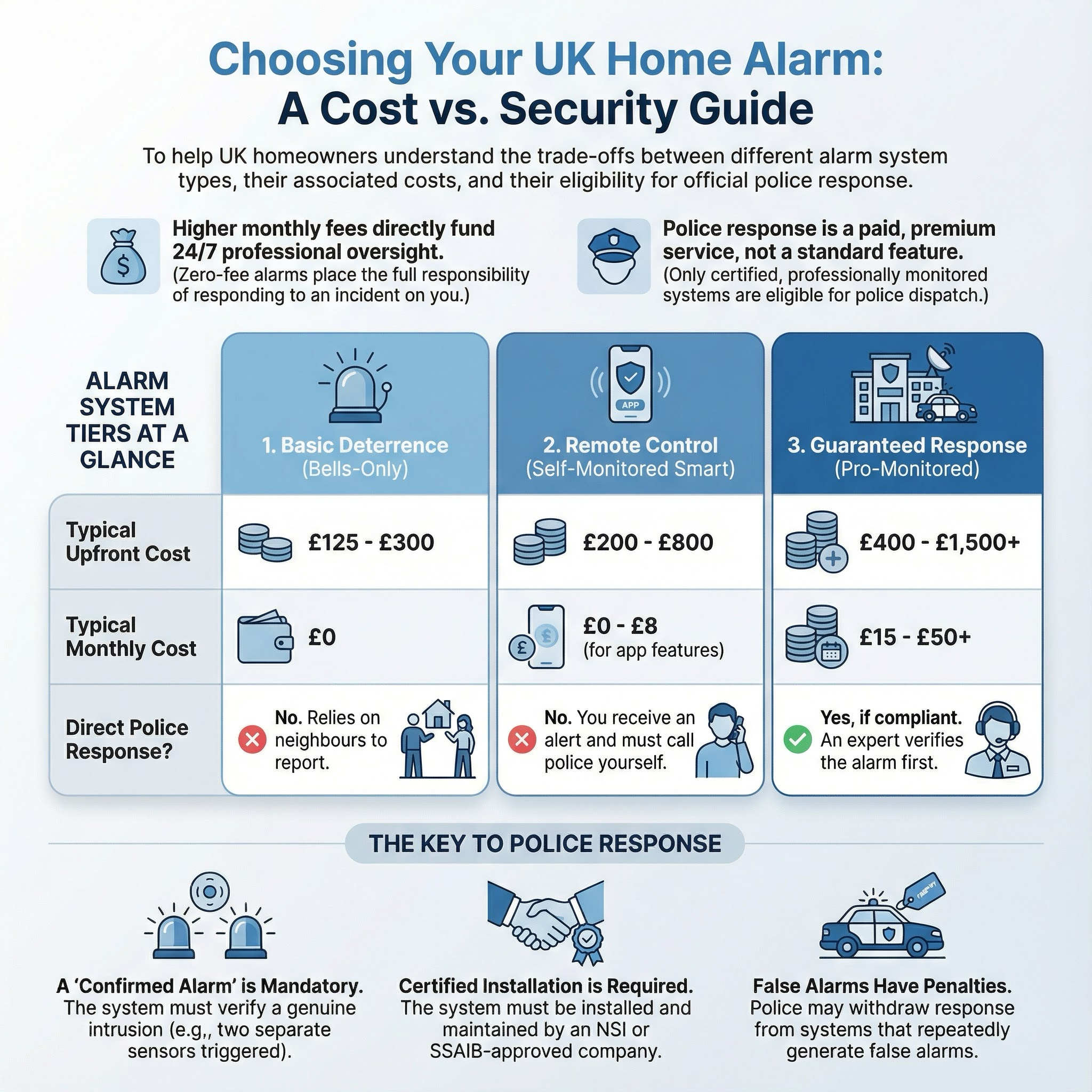
Alarms & Security explained
Whether you are looking for a simple doorbell camera or a comprehensive multi-camera PoE (Power over Ethernet) system, professional installation ensures your property is covered without blind spots or legal pitfalls regarding neighbour privacy.
Prices vary based on the number of cameras, the resolution (4K vs 1080p), and whether the system is wired or wireless. Wired systems are generally more expensive to install due to the labour involved in running cables.
| Item / Service | Low £ | High £ | Notes |
|---|---|---|---|
| Basic 2-Camera Wireless System | £350 | £550 | Includes setup and minor drilling for power. |
| Standard 4-Camera Wired (PoE) System | £650 | £1,200 | Full 4K setup with NVR storage and cabling. |
| Labour Only (Customer supplied kit) | £250 | £500 | Daily rate for a 4-camera installation. |
| Smart Video Doorbell Installation | £100 | £200 | Hardwired to existing chime transformer. |
| Additional Camera Add-on | £120 | £200 | Per camera, including cabling and mounting. |
Labour costs are often higher in London and the South East. Complex installs requiring scaffolding or extensive "loft crawls" to hide cables will also increase the final quote.
While "plug-and-play" wireless cameras are DIY-friendly, professional installation is recommended for wired systems. Professionals have the tools to work safely at height and the expertise to ensure cables are hidden and weatherproofed. Furthermore, if the installation requires a new dedicated power socket in the loft, a Part P qualified electrician should carry out that specific task.
Professional installers provide a "Certificate of Compliance" which can often be used to reduce home insurance premiums.
In most cases, no. CCTV is usually considered "permitted development." However, if your property is a Listed Building or in a Conservation Area, you should check with your local council first.
Yes, if the cameras are pointed directly at their windows or private garden. Using "privacy masking" software and ensuring cameras are angled responsibly will usually resolve any legal disputes.
A wired NVR/DVR system will continue to record to the local hard drive even without internet. However, you will lose the ability to view the footage remotely on your phone until the connection is restored.
4K offers four times the resolution of 1080p (Full HD). This is crucial for "digital zooming"—allowing you to read a car number plate or identify a face from a distance without the image becoming pixelated.
Many "smart" brands (like Ring or Arlo) charge monthly fees to save footage to the cloud. Professional NVR systems usually have no monthly fees as the footage is stored locally on your own hard drive.
This guide was written with AI assistance and is intended for general information only. Prices are estimates based on UK averages and may vary by region. Always get at least three quotes and consult a qualified professional before starting any work.
Ask follow-ups in plain English. The AI explains options, sequencing and what to ask the alarms & security — so you walk in informed.
Removing an old or obsolete alarm system is a common task for UK homeowners, especially when upgrading to smart technology or during home renovations. A redunda...
READ GUIDE →GuideFor UK homeowners who operate home-based workshops, laboratories, or studios involving hazardous chemicals, a functioning emergency eyewash station is a critica...
READ GUIDE →GuideElectric gates are a premium addition to any UK home, offering enhanced security, privacy, and significant kerb appeal. For many homeowners, the convenience of ...
READ GUIDE →GuideA malfunctioning CCTV system is more than just a technical glitch; it is a significant security gap that can leave your UK home vulnerable and potentially inval...
READ GUIDE →GuideWhen a burglar alarm triggers unexpectedly or shows a persistent fault code, it is more than just a noise nuisance. A malfunctioning security system leaves your...
READ GUIDE →GuideA functional gate is the first line of defence for your UK home, providing essential security, privacy, and kerb appeal. Whether it is a sagging timber side gat...
READ GUIDE →